Precision matters when you are powering a device that holds your work, memories, and daily tasks. Many people treat chargers as interchangeable tools, but laptops are far more sensitive than phones when it comes to power input. A mismatched plug or incorrect voltage can slowly wear down the battery, cause inconsistent charging, or, in some cases, even damage internal components. This is why choosing the right replacement charger should never be rushed or based on guesswork. To help you avoid hidden risks and make a safe, confident decision, here is what you need to know in this article.
Step 1: Match the Connector Tip Precisely
Identify Your Laptop Brand’s Specific Connector Type
Most people discover the importance of connector tips only when a charger refuses to fit, wobbles loosely in the port or refuses to stay plugged in. Different laptop models—even within the same brand—use distinct connectors that vary in length, diameter, and shape. Some brands switch their designs every few years, which makes it necessary to double-check compatibility rather than rely on memory. The quickest way is to look at your original charger, where the connector type is often listed or visually identifiable. Another good method is checking the support page for your laptop model. Taking the time to confirm this detail saves frustration and protects the charging port from wear.
Understand Barrel Tip vs. USB-C Charging
Older laptops commonly use barrel-style round connectors, while newer ones increasingly rely on USB-C. Barrel tips come in many subtle variations, so two that “look the same” can still differ internally. USB-C simplifies the experience because it follows a universal physical design, but that does not automatically mean every USB-C charger works with every laptop. Some laptops require USB-C chargers that support specific power protocols such as USB-PD. Others need higher wattage than standard phone or tablet chargers can provide. Understanding which category your laptop belongs to prevents the common mistake of assuming all USB-C chargers are interchangeable. Knowing these differences helps you choose a charger that delivers stable, safe power.
Step 2: Verify Voltage and Wattage Requirements
Why Voltage Must Match Exactly
Voltage is the most important number to match because it tells your charger how much electrical force to send into your laptop. Too high, and it may overheat internal circuits; too low, and your battery may fail to charge reliably or the system may behave unpredictably. Your laptop’s voltage requirement is usually printed on the underside of the device or on the original charger label. It is essential that the charger’s output voltage matches this number precisely. Even a small mismatch can reduce battery health over time. Paying attention to this detail gives your laptop a stable foundation and ensures the battery remains healthy over the long run.
How to Ensure Wattage Meets or Exceeds Needs
Wattage determines how fast your laptop can charge and whether the charger can keep up with power-intensive tasks like video editing or running virtual machines. Unlike voltage, wattage can be equal to or higher than your laptop’s requirement. A charger with higher wattage simply means it has more “room to breathe” during heavy workloads. However, a charger with lower wattage may struggle, causing slow charging or forcing your laptop to draw more power than the charger can comfortably supply. You can find the recommended wattage printed with the voltage information. Choosing a charger that meets or exceeds this number helps ensure a consistent experience, whether you are multitasking or simply browsing the web.
See also: iPhone Cable Durability Guide for Heavy Users
Step 3: Consider Charger Technology and Portability
The Benefits of GaN Chargers for Travel
Modern GaN chargers use gallium nitride components, which allow them to be smaller, cooler, and more energy-efficient than traditional silicon chargers. For people who work on the go, this makes an enormous difference—your backpack feels lighter, your desk less cluttered, and your charging brick stays cooler even when powering a demanding laptop. When your old laptop charger stops working, many replacement options today use GaN technology, improving both efficiency and durability. This is also where many people naturally consider upgrading rather than simply replacing their previous charger with the same bulky model. The shift to GaN is one of the most convenient upgrades you can make.
Multi-Port Chargers for Simultaneous Device Charging
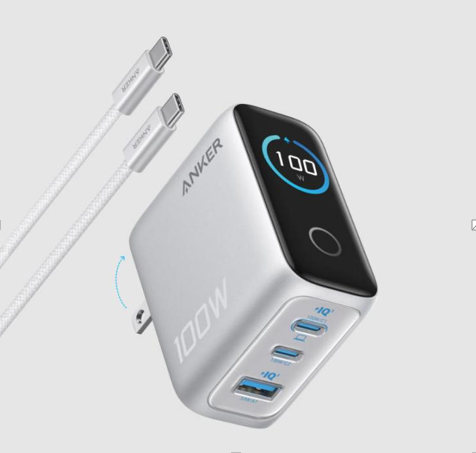
If your daily routine involves charging your phone, earbuds, and laptop together, a multi-port charger can tidy your workspace and simplify travel. These chargers distribute power intelligently, deciding which device needs more energy at a given moment. For many users, this eliminates the need to pack multiple bricks and reduces outlet clutter at home or in cafés. When replacing a laptop charger, some people prefer choosing a multi-port GaN option, and this is where an Anker charger becomes a very practical and reliable solution. Its well-engineered designs offer stable performance while letting you power multiple devices without sacrificing safety.
Step 4: Choose Between OEM and Third-Party Options
When to Buy from the Original Manufacturer
Original chargers from the laptop manufacturer are designed to match every specification perfectly, making them the safest default option. This is especially helpful if your laptop has unusual power requirements or uses a proprietary connector. OEM chargers typically undergo extensive testing and follow strict safety guidelines, which provides peace of mind for users who prefer guaranteed compatibility. However, they can be more expensive and sometimes harder to find for older laptop models. Still, if reliability and absolute matching of specifications matter most to you, going with the original manufacturer remains a dependable choice.
What to Look for in a Reputable Third-Party Brand
When selecting a third-party replacement, it is important to choose a brand known for safety standards, transparent specifications, and consistent quality control. Look for clear labeling of voltage, wattage, and supported charging protocols rather than vague descriptions. Reputable brands provide proper certifications, durable materials, and stable charging behavior. Customer reviews can help reveal real-world experiences, such as how warm the charger gets or how well it fits into daily routines. Choosing a high-quality third-party option allows you to balance affordability with performance while still protecting your laptop’s battery health and overall longevity.

Conclusion
Choosing the right charger becomes much easier when you break the process into clear steps: verify the connector, confirm voltage and wattage, consider modern technologies, and decide whether OEM or trusted third-party brands fit your needs. By slowing down and checking these details, you protect your laptop, avoid performance issues, and invest in a tool that supports your daily routine rather than complicates it. A reliable charger may be small, but it carries the responsibility of powering your work, entertainment, and communication. Taking a little care now ensures your laptop stays healthy and ready for whatever you need next.